

Use this free Scientific Calculator to solve algebra, calculus, physics, and exam problems with textbook operator precedence. Our scientific calculator online works simultaneously as a trigonometry scientific calculator, a scientific calculator with fractions, and an advanced scientific calculator for everyday coursework. Because all expressions run inside a dedicated mathematical parser in your browser, results appear instantly on both mobile phones and desktop keyboards.
What Is a Scientific Calculator?
An advanced expression solver extends basic four-function arithmetic with nested parentheses, exponents, roots, logarithms, factorials, constants (π and e), memory registers, and circular trig functions. Standard pocket calculators evaluate operations strictly from left to right. In contrast, our engineering scientific calculator parses the entire formula first. Therefore, multiplication, division, and exponentiation execute in proper algebraic order for advanced maths.
Students preparing for board exams, university physics labs, or aptitude tests frequently need quick verification without carrying hardware. Note that this page is a browser-based web tool rather than a downloadable native binary or offline desktop installer. Consequently, you can open it immediately from any phone or laptop without installing software.
How to Use a Scientific Calculator Online
Operating this scientific calculator online is straightforward whether you tap keys on a touchscreen or type on a physical keyboard:
- Select Your Angle Mode First: Toggle DEG (degrees) or RAD (radians) at the top-left of the screen before evaluating
sin,cos,tan, or their inverse functions. - Enter Your Expression: Tap keypad buttons or type directly using
+,-,*,/,^,( ),!, and function names such assin(30),sqrt(144), orlog(1000). - Toggle Exact Fractions or Scientific Notation: Click a/b to display rational results as exact improper and mixed fractions, or click SCI for exponential engineering form.
- Use Memory & Session History: Store running totals with
M+,M−,MR, andMC, recall your previous answer withAns, or click any item in the History panel to reuse an earlier equation.
Scientific Calculator Functions Explained
Every button on this advanced scientific calculator maps to a specific mathematical definition:
- Powers & Roots (
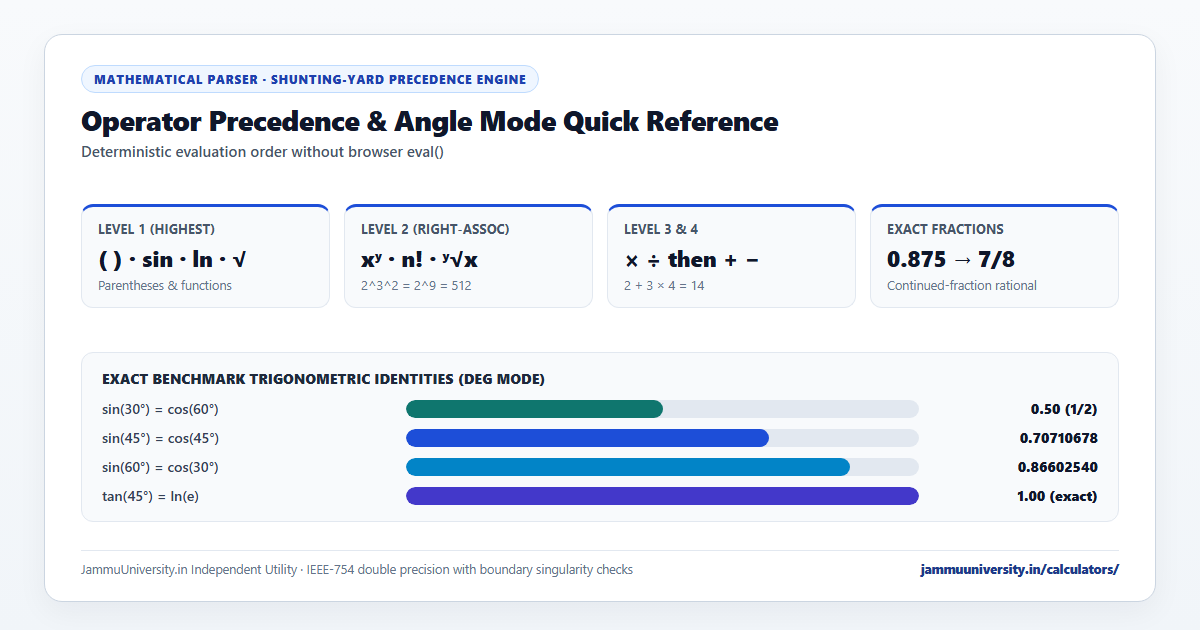
x²,x³,xʸ,√x,∛x,ʸ√x): Exponents are evaluated right-associatively, meaning2^3^2equals2^(3²) = 512, matching standard mathematical notation. - Logarithms (
log,ln,10ˣ,eˣ): Herelog(x)computes the base-10 common logarithm used in pH and decibel scales, whereasln(x)computes the natural logarithm basee ≈ 2.718281828. - Factorials & Reciprocals (
n!,1/x): Computes exact integer factorials up to170!(above which IEEE-754 double-precision numbers overflow) and multiplicative inverses for any non-zero input. - Percentages (
%): Converts a number to its hundredth ratio (x / 100) inside expressions. For multi-step retail markups, GST reversals, or exam score ratios, you can also open our dedicated multi-mode percentage solver.
How Browser Interfaces Compare (Google, Casio & Desmos Styles)
Students comparing a google scientific calculator, a casio-style keypad, or a desmos expression pad notice distinct layout habits across platforms. Single-line bars auto-insert an opening parenthesis after sin(, textbook pads prioritize a fraction-decimal toggle, and graphing bars preview live expressions before you press =. Our independent trigonometry calculator combines live expression preview, explicit DEG/RAD pills, and an a/b rational converter in one clean layout, without affiliation with Google, Casio, or Desmos.
DEG vs RAD
Mismatched angle units cause more exam mistakes than almost any other calculator setting. One full circle equals 360° or 2π radians, so 1 radian = 180° / π ≈ 57.2958°. In DEG mode, our trigonometry scientific calculator evaluates sin(30) = 0.5, cos(60) = 0.5, and tan(45) = 1, while catching asymptotic singularities such as tan(90°) cleanly instead of returning floating-point noise. Switch to RAD whenever you differentiate trigonometric functions in calculus, evaluate Taylor series, or compute angular frequency ω = 2πf.
Scientific Calculator With Fractions
Floating-point decimals occasionally obscure neat textbook answers—for instance, 1/3 + 1/6 equals 0.5, and 3/8 + 5/12 equals 0.791666666667. When you use our scientific calculator with fractions, a continued-fraction rational approximator automatically checks whether your decimal result corresponds to an exact fraction with a denominator up to 10,000. Consequently, 3/8 + 5/12 immediately displays Exact fraction: 19/24 below the main readout, and improper ratios such as 7/4 show both 7/4 and 1 3/4.
Engineering and Student Examples
- Projectile Range (Physics): For launch speed
v = 20 m/sat30°underg = 9.8 m/s², enter(20^2 * sin(60)) / 9.8in DEG mode to obtain 35.34797566 m. - Sound Intensity Level (Acoustics): To compare
I = 5 × 10⁻⁵ W/m²against threshold10⁻¹² W/m², enter10 * log(5E-5 / 1E-12)to get 76.9897 dB. - Continuous Growth Check: Enter
10000 * exp(0.08 * 5)to evaluate₹10,000 × e⁰·⁴= 14,918.246976.
Common Calculator Errors
Whenever an input violates a real-number domain rule, the parser explains the exact mathematical issue rather than showing a cryptic NaN:
- Division by zero: Triggered by
1 / 0or negative powers of zero such as0^-2. - Undefined tangent: Triggered at odd multiples of
90°(orπ/2radians) wherecos(θ) = 0. - Logarithm or inverse-trig domain error: Triggered when
log(x)orln(x)receivesx ≤ 0, or whenasin(x)/acos(x)receives|x| > 1. - Non-integer factorial or even root of a negative number: Factorials require integers
0 ≤ n ≤ 170, and real square roots requirex ≥ 0.
Scientific Calculator FAQs
1. Does this Scientific Calculator follow BODMAS / PEMDAS order of operations?
Yes. Parentheses and functions evaluate first, followed by right-associative powers and factorials, then multiplication and division from left to right, and finally addition and subtraction.
2. Why did sin(30) give −0.9880316 instead of 0.5?
That happens when the angle unit is set to RAD (30 radians) rather than DEG (30 degrees). Click the DEG pill above the display to compute degree-based trigonometry.
3. Does this calculator use unsafe JavaScript eval()?
Never. User input is tokenized and evaluated by a custom Shunting-Yard mathematical parser that accepts only whitelisted numbers, constants, operators, and math functions.
4. Can I download this as a standalone mobile app?
We do not distribute a separate downloadable APK or desktop binary. Instead, this lightweight web page works directly in any mobile or desktop browser with zero installation.
Editorial Note: Built and maintained by JammuUniversity.in, an independent digital publication (unaffiliated with the University of Jammu, Google, Casio, or Desmos). Standard constants follow NIST reference definitions. Explore all eleven utilities in our calculator directory.